I need a diagram of the serpentine belt placement for the car listed above.
Oct 7, 2017 at 5:57 AM

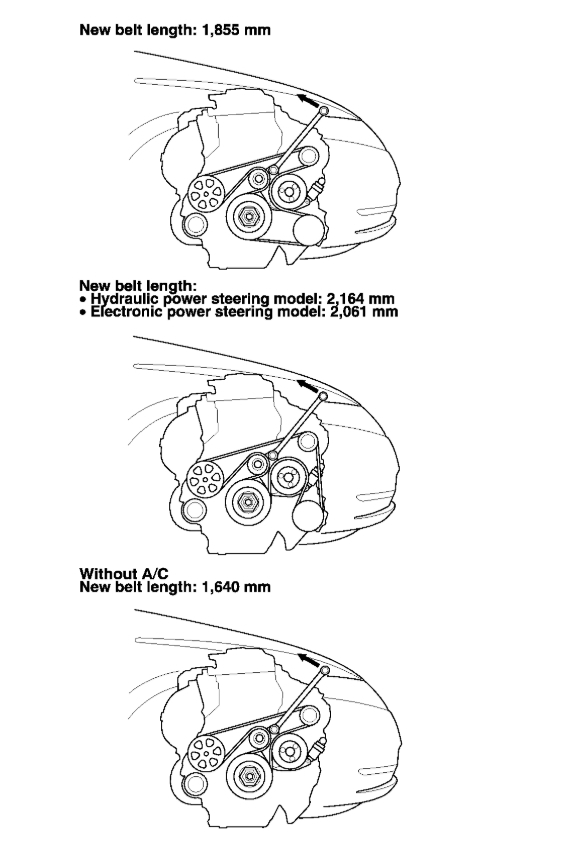
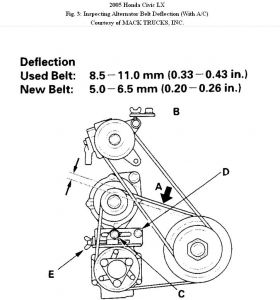
Use the 2005 Honda Civic drive-belt diagram to confirm routing. To replace or adjust the belt, loosen mounting bolt B, lock bolt C, and lower bracket bolt D, then turn adjusting bolt E to set tension and retighten the bolts. Recheck tension; if a new belt was installed, run the engine for 5 minutes and readjust to the used-belt specification. Old and new refer to a reused versus replacement belt, not inner and outer belts.
The original request was for a 2009 Honda Civic serpentine belt diagram. A later user asked specifically for a 2005 Honda Civic LX diagram and step-by-step instructions. The expert posted a drive-belt diagram and an adjustment procedure using bolts B, C, D, and E, including a recheck after running a newly installed belt. The user thought the old/new wording meant two belts, and the expert clarified that it distinguishes a reused belt from a replacement belt.