Welcome to 2carpros.com
You will need to remove the center console finish to remove and replace the cover assembly. I have attached the directions for removal first. The second set of directions refer to the cover and power outlet. All attached pictures correlate with these directions.
__________________________
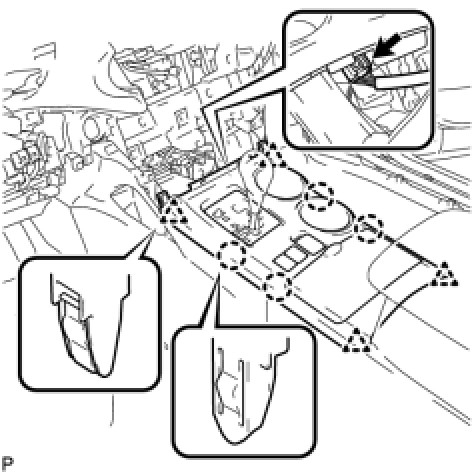
28. REMOVE UPPER CONSOLE PANEL SUB-ASSEMBLY
(a)Disengage the 4 claws and 4 clips.
pic 1
(b)Disconnect the connector and remove the upper console panel sub-assembly.
_________________________
REMOVAL
OTHER SYSTEM: CIGARETTE LIGHTER: REMOVAL
1. REMOVE CENTER INSTRUMENT CLUSTER FINISH PANEL ASSEMBLY (w/o Smart Key System) See: Dashboard / Instrument Panel > Removal and Replacement > Removal
2. REMOVE CENTER INSTRUMENT CLUSTER FINISH PANEL ASSEMBLY (w/ Smart Key System) See: Dashboard / Instrument Panel > Removal and Replacement > Removal
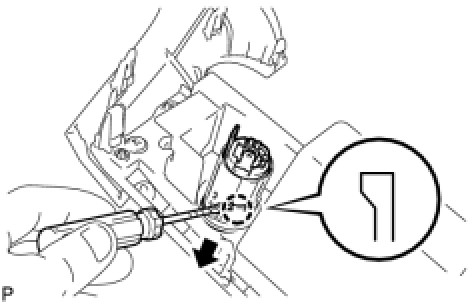
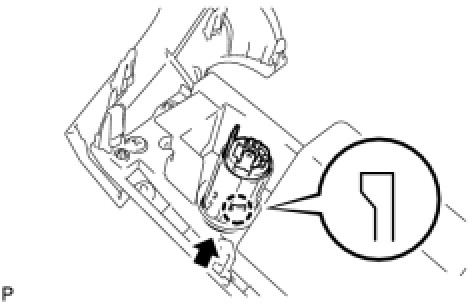
3. REMOVE POWER POINT SOCKET ASSEMBLY
(a)Disengage the claw and remove the power point socket assembly.
pic 2
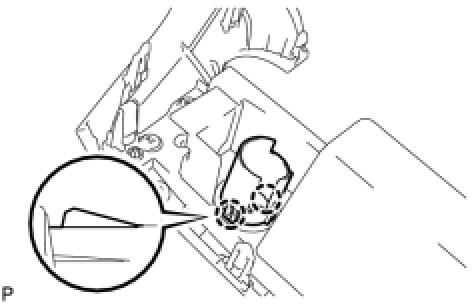
4. REMOVE POWER OUTLET SOCKET COVER
(a)Disengage the 2 claws and remove the power outlet socket cover.
pic 3
Installation
OTHER SYSTEM: CIGARETTE LIGHTER: INSTALLATION
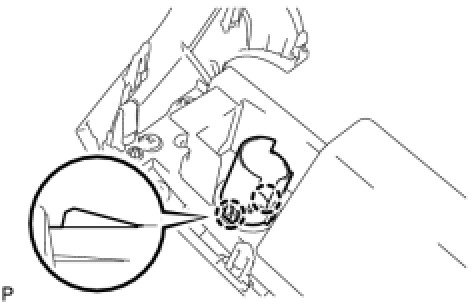
1. INSTALL POWER OUTLET SOCKET COVER
(a)Engage the 2 claws and install the power outlet socket cover.
pic 4
2. INSTALL POWER POINT SOCKET ASSEMBLY
(a)Engage the claw and install the power point socket assembly.
pic 5
3. INSTALL CENTER INSTRUMENT CLUSTER FINISH PANEL ASSEMBLY (w/o Smart Key System) See: Dashboard / Instrument Panel > Removal and Replacement > Installation
4. INSTALL CENTER INSTRUMENT CLUSTER FINISH PANEL ASSEMBLY (w/ Smart Key System) See: Dashboard / Instrument Panel > Removal and Replacement > Installation
_____________________
Let me know if this helps.
Joe
Images (Click to enlarge)
May 1, 2019 at 12:29 PM