Headlamp Assembly or Headlamp Bulb Replacement (GT)
Removal Procedure
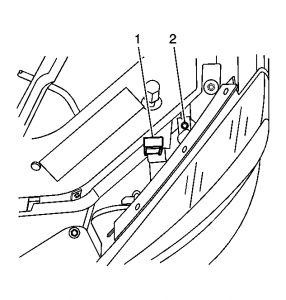
Fig. 65: View Of Headlamp Retainer
Courtesy of GENERAL MOTORS CORP.
Raise the hood.
Lift upward on the headlamp retainer (1).
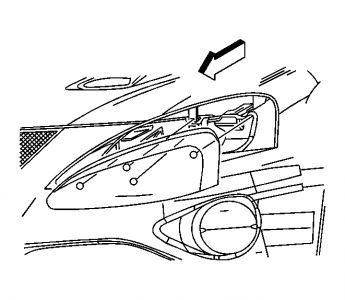
Fig. 66: View Of Headlamp Assembly
Courtesy of GENERAL MOTORS CORP.
Pull the headlamp assembly outward enough to release the headlamp assembly from the upper fascia support.
Position the headlamp assembly away from the vehicle body to access the electrical connector.
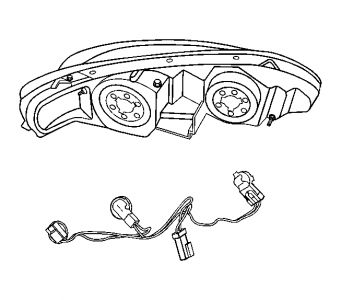
Fig. 67: Electrical Connector & Headlamp Assembly
Courtesy of GENERAL MOTORS CORP.
Disconnect the electrical connector from the headlamp assembly.
Remove the headlamp assembly from the vehicle.
CAUTION:Refer to Halogen Bulb Caution in Cautions and Notices.
Use caution handling halogen bulbs.
Remove the headlamp bulb/socket from the headlamp, by turning counterclockwise.
Remove the headlamp bulb/socket from the headlamp assembly.
Installation Procedure
Fig. 68: Electrical Connector & Headlamp Assembly
Courtesy of GENERAL MOTORS CORP.
Connect the electrical connector to the headlamp bulb/socket.
Install the headlamp bulb/socket to the headlamp, by turning clockwise.
Position the headlamp assembly to the vehicle.
Connect the electrical connector to the headlamp assembly.
Fig. 69: View Of Headlamp Assembly
Courtesy of GENERAL MOTORS CORP.
Position the headlamp assembly to the upper fascia support.
Align the headlamp tabs to the upper fascia support.
Press the headlamp assembly inward to engage the tabs.
Fig. 70: View Of Headlamp Retainer
Courtesy of GENERAL MOTORS CORP.
Press downward to engage the headlamp retainer (1).
Check and adjust the headlamp aim as necessary.
Dec 6, 2008 at 10:11 PM