2001 Oldsmobile Silhouette Wiper blades off in the up posit

2001 OLDSMOBILE SILHOUETTE
150,000 MILES • 6 CYL • 2WD • AUTOMATIC
Avatar
SWOWARRIOR
  • MEMBER
  • 1 POST
I recently changed the wiper blades on my Silhouette. Following the instructions in the owners manual, I set the wipers to the lowest intermittent setting and turned the ignition off when the wipers were at the outer most position of the wiper pattern. I have done this many times before. This time when I started the car the wipers worked fine until I shut them off. Instead of returning to their normal stowed position, they went to the outer position and stayed there. I have tried every combination of shutting the car off with the wipers in every position hoping to retrain it. I even tried pulling the fuse (#20) for the wipers hoping that it would wipe out any memory of the staying in the outer position. Nothing has worked. I know that I pulled the correct fuse as the wipers wouldn't work with the fuse out.

The wipers work fine when they are on. They just remain in the outer position when they are shut off.

Do you have any idea how to reset the wipers to return to their normal stowed position?

Thanks,
Alan
Feb 18, 2010 at 7:56 PM
Advertisement
Avatar
SERVICE WRITER
  • ASE Certified Mechanic
  • 9,123 POSTS
  • ASE Certified Mechanic
I've seen way too many wiper modules go bad on these, first disconnect the multifunction connector and the lower left of the steering column. IF they park, then replace the multi-function switch.

Assuming you didn't bend anything changing the blades, and I doubt you did; and if the wipers still did not park after disconnecting the connector then I would suspect the wiper control module is bad. Wirng may be an issue, but I have yet to come across that. The module comes with the motor if you buy it aftermarket.
Having said that, I have run into bad modules right out of the box.
Feb 19, 2010 at 4:50 AM
Avatar
SERVICE WRITER
  • ASE Certified Mechanic
  • 9,123 POSTS
  • ASE Certified Mechanic
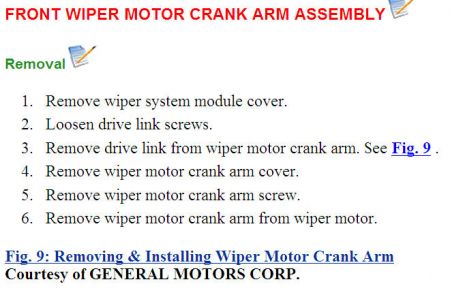
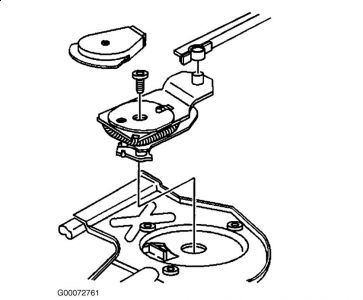
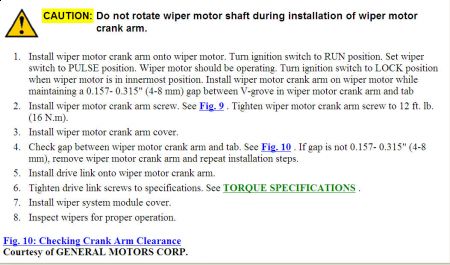
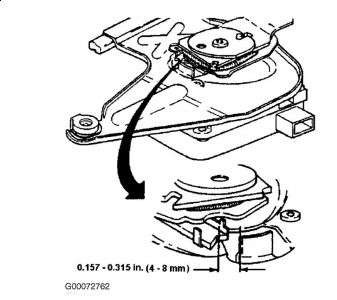
You can also try to reset the crank arm.


https://images.2carpros.com/forum/automotive_pictures/30961_ca1_1.jpg


https://images.2carpros.com/forum/automotive_pictures/30961_ca2_1.jpg


https://images.2carpros.com/forum/automotive_pictures/30961_ca3_1.jpg


https://images.2carpros.com/forum/automotive_pictures/30961_ca4_1.jpg

Feb 19, 2010 at 4:59 AM
Join 2CarPros for free, one of the most advanced car repair communities on the internet. From first-time drivers to seasoned mechanics, everyone is welcome to reply, share details, and get better answers. You can add a temporary image or video first; uploads are limited to 20 MB.
Ask a Free Question
Repair Safety Notice: This information is for general instructional purposes only. Vehicle repair can be dangerous. Verify all information, follow manufacturer service procedures, use proper tools and safety equipment, and consult a qualified repair shop when needed.