No OBD connection

2005 SATURN VUE
244,000 MILES • 2.5L • 6 CYL • 4WD • AUTOMATIC
Avatar
LRODRIG
  • MEMBER
  • 4 POSTS
Just got a tune up on car. No lights currently on. Went to emissions and it failed due to OBD connection failed. Not reading. What could this be?
Thank you
Oct 10, 2018 at 10:49 AM
Advertisement
Avatar
JACOBANDNICKOLAS
  • CERTIFIED EXPERT
  • 110,175 POSTS
Hi and thanks for using 2CarPros.com.

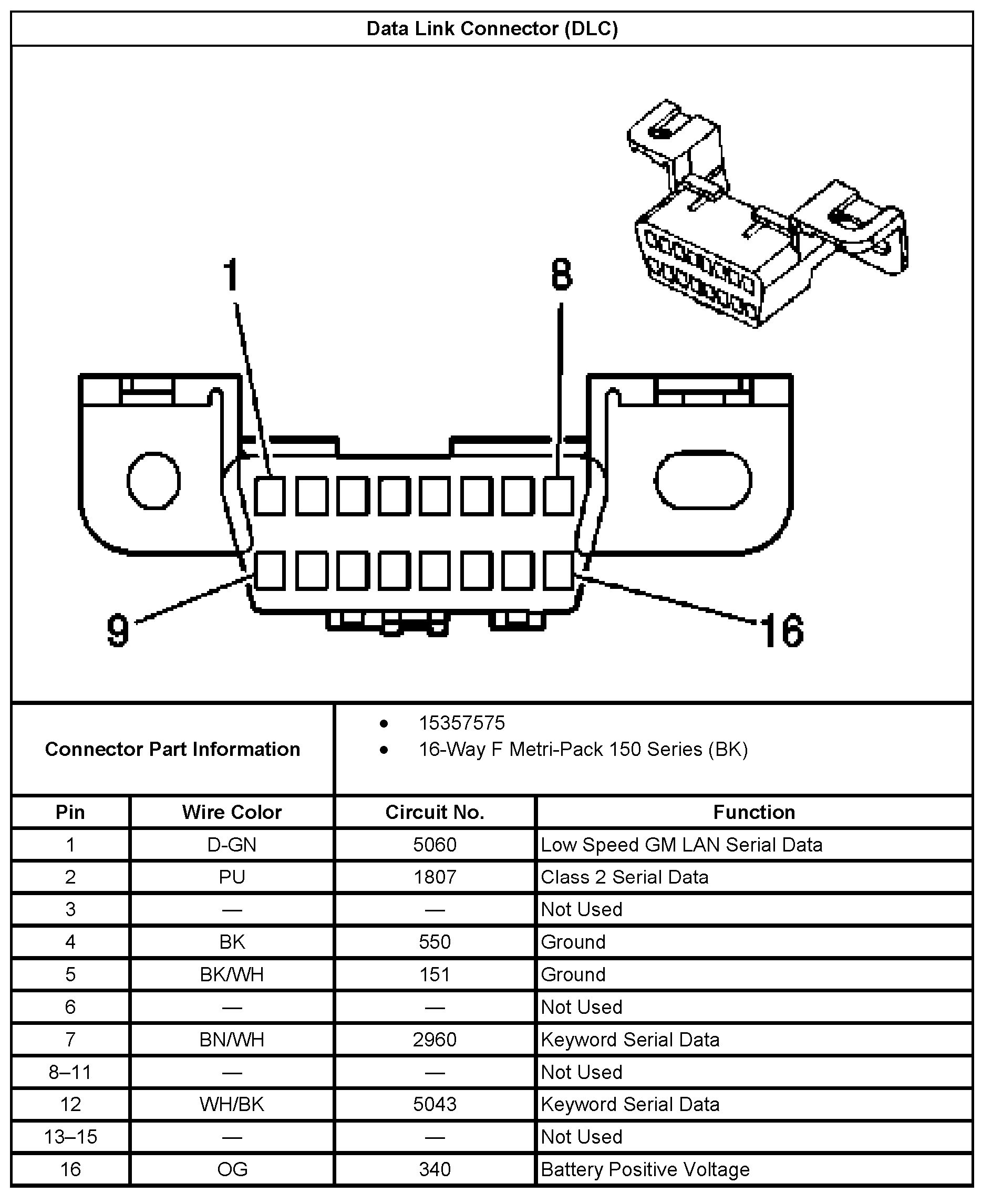
Most commonly, where there is a problem connecting a scanner, the issue lies with a bad ground or power to the Data Link Connector (DLC). I have attached a picture for you to see. What you should check first is if there is power to pin 16 and then check for continuity/ground on pins 4 and 5. You will need to use a multi-meter for checking continuity. A test light can be used on pin 16 to check power. Here are links that discuss checking wiring, how to use a test light, and how to use a volt meter/multi-meter:

https://www.2carpros.com/articles/how-to-use-a-test-light-circuit-tester

https://www.2carpros.com/articles/how-to-use-a-voltmeter

https://www.2carpros.com/articles/how-to-check-wiring


The attached picture shows pin locations and allocations. Identify the correct pins before checking.

Let me know what you find. At that point, I will be able to direct you in the repair procedure.

Take care,
Joe
Oct 10, 2018 at 6:53 PM
Avatar
LRODRIG
  • MEMBER
  • 4 POSTS
Okay Joe, so the pin #4 is not reading power.
Oct 11, 2018 at 2:42 PM
Advertisement
Avatar
JACOBANDNICKOLAS
  • CERTIFIED EXPERT
  • 110,175 POSTS
Welcome back.

Pins 4 and 5 should not have power, but they should have continuity to ground. If that is what you meant, then you have lost ground to pin 4 and that is why a scanner will not connect.

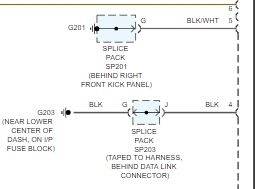
Here is what needs done. Under the dash near the fuse box, locate the solid black wire from the DLC. That is the wire from pin 4. You will find it is spliced and taped to other grounds. Inspect it for condition, make sure the wire is not damaged, and make sure there is not a corrosion build up on the splice. If need be, make a new ground for it. Please make sure there is no power in the wire of any kind if you make a new ground. There should not be power. If there is, you have the wrong wire. You do not want to ground a power supply wire. Either it will blow a fuse (in the best case) or it could damage a component or start a fire.

I have attached a portion of the wiring schematic for you to see. Again, pin 4 is a solid black wire. Pin 5 will be a black wire with a white tracer. The schematic also indicates location.

Do this and let me know what you find or if you have other questions.

Take care,
Joe
Oct 11, 2018 at 5:19 PM