It is your ignition switch
REMOVAL
Disarm airbag system, if equipped.
Disconnect battery ground cable, then remove five steering column shroud attaching screws.
Disconnect battery ground cable, then remove five steering column shroud attaching screws.
Remove two bolts and two nuts attaching steering column to column bracket, then lower steering column assembly to seat and remove column shrouds.
Disconnect ignition switch wire connector, then rotate ignition switch lock cylinder to the RUN position.
Remove the two retaining screws connecting the switch to the lock cylinder housing.
Detach ignition switch from actuator pin, then remove switch.
INSTALLATION
Check to ensure that ignition switch actuator pin slot and ignition switch lock cylinder are in the RUN position.
NOTE: Replacement ignition switches are set in the RUN position.
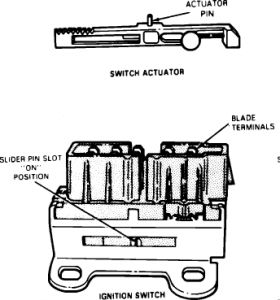
Ignition Switch
Position ignition switch onto actuator pin. It may be necessary to move switch slightly to align switch to column mounting bolt holes. The RUN position on the ignition switch lock cylinder is located approximately 90 °from the LOCK position.
Install and tighten screws to 50-70 in lb.
Connect wire connector to ignition switch, then connect battery ground cable and check ignition switch for proper operation.
Position upper shroud on column, then raise steering column and install column mounting bracket to instrument panel attaching bolts. Torque bolts to 15-25 ft lb.
Position lower shroud on column and install attaching bolts.
https://www.2carpros.com/kpages/auto_repair_manuals_alldata.htm
Mar 27, 2010 at 10:51 PM