Electronics still on after turning van off and removing the key

210,000 MILES • 6 CYL • 2WD • AUTOMATIC
Avatar
CHARLIE ROY LIVE
  • MEMBER
  • 4 POSTS
Hi,
When I turn car off and remove key, the accessories still operate.
Wipers will still go, radio can still be on and interior lights are still on.
I assume this is not supposed to happen?
Is there a relatively easy fix?

Thanks
Dec 29, 2019 at 4:55 AM
Avatar
JACOBANDNICKOLAS
  • ✓Experienced Mechanic
  • 110,244 POSTS
Hi,

Does it continue to happen if you open the door?

Let me know.
Joe
Dec 29, 2019 at 10:34 AM
Avatar
CHARLIE ROY LIVE
  • MEMBER
  • 4 POSTS
I just hoped in car, closed the door and turned the radio on without the key in the ignition.
The radio came on.
I then opened the door whilst radio was on and it stayed on.
All without keys in ignition..
Battery was dead this morning so I'm thinking something must still be on...

Thanks heaps
Dec 29, 2019 at 10:53 AM
Avatar
JACOBANDNICKOLAS
  • ✓Experienced Mechanic
  • 110,244 POSTS
When you turn the key off, check to make sure it is fully off. Maybe the tumbler has gone bad and is allowing you to remove the key in any position. Also, if that isn't the case, it sounds like there is a problem with the ignition switch itself.

Let me know.

Joe
Dec 30, 2019 at 2:27 PM
Avatar
CHARLIE ROY LIVE
  • MEMBER
  • 4 POSTS
Hey Joe, thanks for the response.
I think there is a problem with the ignition switch.
After doing some reading I tried the newer key (old one was well worn) and giving it a jiggle and a wobble, I managed to remove key and radio turned off.
Is it a difficult job to replace the ignition switch?

Thanks again
Dec 30, 2019 at 11:21 PM
Avatar
JACOBANDNICKOLAS
  • ✓Experienced Mechanic
  • 110,244 POSTS
Hi,

No, it isn't hard. In reality, you aren't replacing the switch but rather the key lock cylinder. My only concern is this. Some of these vehicles will require reprogramming so the computer recognizes the new key. However, I just read through the directions, and nothing like that is indicated on this model year.

Regardless, here are the directions. Take a look through them to see if there is anything you may have a question about and let me know. Also, you're not alone. I can help if you run into trouble.

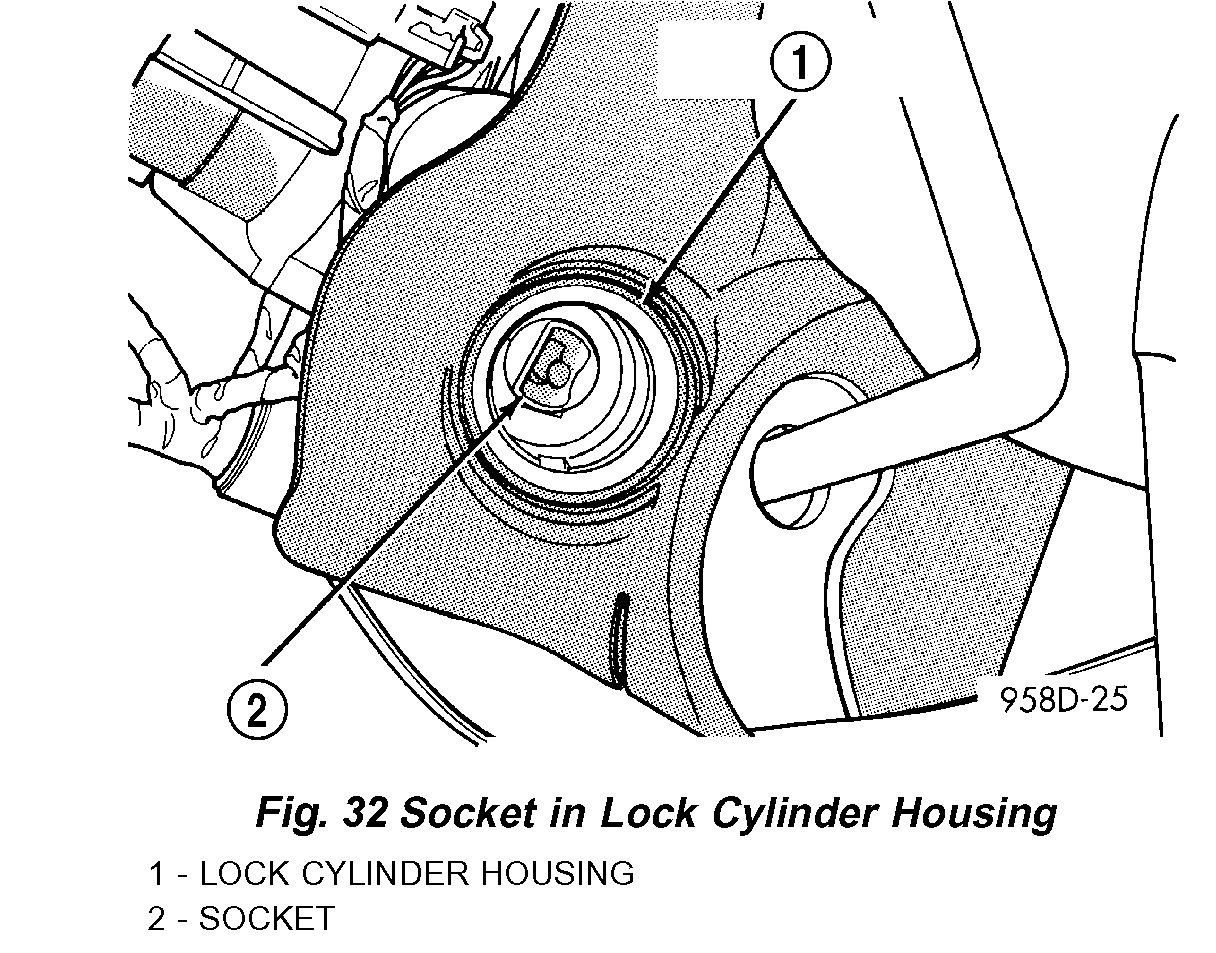
Here are the directions. The attached picture correlates with the directions.

________________________________________________

2003 Dodge or Ram Truck Caravan V6-3.3L VIN R
Key/Lock Cylinder
Vehicle Starting and Charging Sensors and Switches - Starting and Charging Ignition Switch Ignition Switch Lock Cylinder Service and Repair Procedures Key/Lock Cylinder
KEY/LOCK CYLINDER
KEY/LOCK CYLINDER

REMOVAL
1. Disconnect negative cable from battery.
2. Remove steering column cover retaining screws.
3. Remove screws holding steering column shrouds and remove lower shroud.
4. Place key cylinder in RUN position. Depress lock cylinder retaining tab on the bottom of the lock housing and remove key cylinder.

INSTALLATION
1. Install key in lock cylinder. Turn key to run position (retaining tab on lock cylinder can be depressed).


pic 1


2. The shaft at the end of the lock cylinder aligns with the socket in the end of the housing. To align the socket with the lock cylinder, ensure the socket is in the Run position (Fig. 32).
3. Align the lock cylinder with the grooves in the housing. Slide the lock cylinder into the housing until the tab sticks through the opening in the housing.
4. Turn the key to the Off position. Remove the key.
5. Install lower steering column shroud.
6. Install steering column cover.
7. Connect negative cable to battery.

Let me know how things work out. Also, if you have questions, feel free to ask.

I hope you have a safe and happy new year.

Take care,
Joe
Dec 31, 2019 at 2:08 PM
Avatar
CHARLIE ROY LIVE
  • MEMBER
  • 4 POSTS
Joe you are an absolute legend. Thanks so much for your help with this. I'm going to have a crack at it in the very near future and will keep you posted.
Cheers buddy.
Jan 1, 2020 at 4:48 AM
Avatar
JACOBANDNICKOLAS
  • ✓Experienced Mechanic
  • 110,244 POSTS
You are very welcome. Let me know if you run into any trouble or have questions.

Take care and have a great new year.

Joe
Jan 1, 2020 at 9:19 AM
Add a reply
Join 2CarPros for free, one of the most advanced car repair communities on the internet. From first-time drivers to seasoned mechanics, everyone is welcome to reply, share details, and get better answers. You can add a temporary image or video first; uploads are limited to 20 MB.

Frequently Asked Problems for This Vehicle