CAUTION:This application is an interference engine. Do not rotate camshaft or crankshaft when timing belt is removed, or engine damage may occur.
TIMING BELT
Removal
Disconnect negative battery cable. Disconnect intake air temperature sensor connector from intake air duct. Disconnect the air intake tube from the throttle body. Disconnect the breather tube from the valve cover. Remove the air filter housing.
Raise and support the vehicle. Remove right front wheel. Remove right front splash shield from wheelwell. Remove serpentine accessory drive belt.
Remove crankshaft pulley bolts. It is NOT necessary to remove crankshaft sprocket center bolt. Remove crankshaft pulley. Lower vehicle.
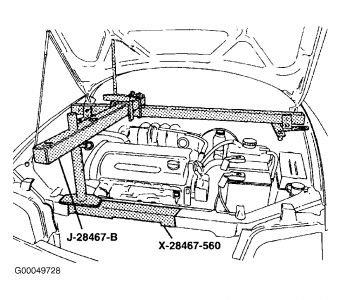
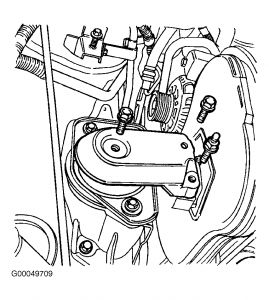
Support engine assembly from above with Support Fixture (J-28467-B). See Fig. 1 . Remove engine mount bracket from timing belt end of engine. See Fig. 2 .
Remove front timing belt cover. Using crankshaft center bolt, rotate crankshaft one full turn clockwise (as viewed from timing belt end of engine).
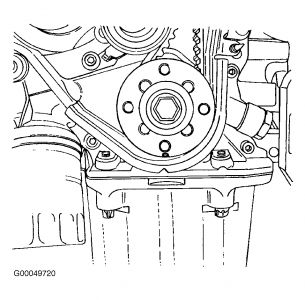
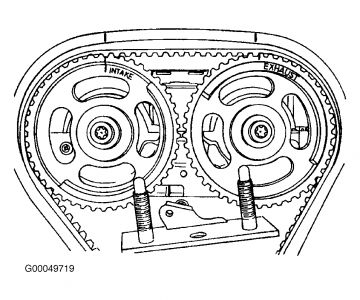
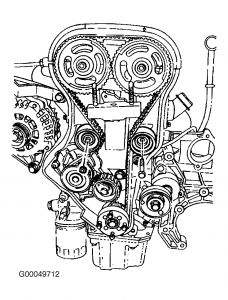
Align mark on crankshaft sprocket with notch at bottom of rear timing belt cover. See Fig. 3 . Align camshaft sprocket timing marks with notches on valve cover. See Fig. 4 .
CAUTION:Engine damage could result if camshaft sprockets are not properly aligned with notches on valve cover.
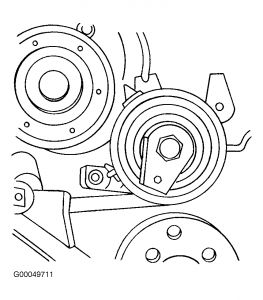
Loosen the automatic tensioner bolt. Use an Allen wrench to rotate tensioner and relieve tension on timing belt. See Fig. 5 . Remove timing belt
Jun 14, 2010 at 2:19 PM