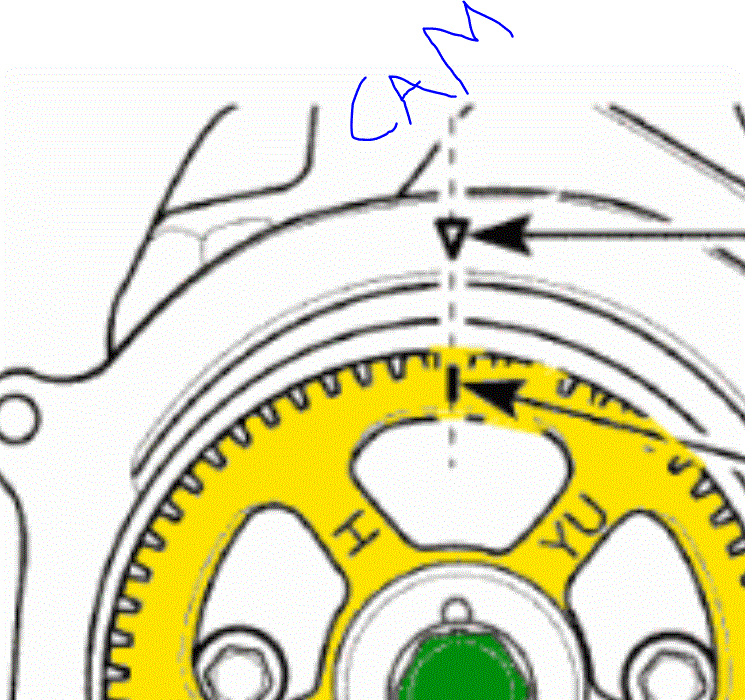
Crank and Cam setting

260,000 MILES • 0.8L • 3 CYL • 2WD • MANUAL
Avatar
TEAMBSI
  • MEMBER
  • 39 POSTS
Please need help with setting my crank and cam. I every time lose the setting the minute I put on the cambelt. What can I do to retain the settings?
Oct 31, 2020 at 1:16 AM
Advertisement
Avatar
JACOBANDNICKOLAS
  • ✓Experienced Mechanic
  • 110,248 POSTS
Hi,

I need you to confirm something for me. I don't start to show the Spark until 2012. Also, please provide the correct engine size so I don't make any mistakes.

Let me know.

Joe
Oct 31, 2020 at 12:27 PM
Avatar
TEAMBSI
  • MEMBER
  • 39 POSTS
Hi morning,

It's a Chevrolet Spark Lite, 0.8 Liter engine, 2010 model.
Oct 31, 2020 at 5:10 PM
Avatar
TEAMBSI
  • MEMBER
  • 39 POSTS
Like the one on my profile picture.
Oct 31, 2020 at 5:11 PM
Avatar
TEAMBSI
  • MEMBER
  • 39 POSTS
Hi Joe,

Any advice yet?
Nov 1, 2020 at 2:43 AM
Avatar
JACOBANDNICKOLAS
  • ✓Experienced Mechanic
  • 110,248 POSTS
Hi,

I have nothing on that vehicle. Are you in the US?

Regardless, I will try my best to help. There should be marks on both the camshaft timing pulley and the crankshaft pulley. Here are the only directions I found related to this engine. Take a look through them and let me know if they help.

______________________________


Make sure cylinder No. 1 - the first on the left, is in the Top Dead Centre (TDC).

The easiest way to do this is by having the front wheels off the ground, the spark plugs removed, placing the transmission in 5th gear, and turning the wheels until the timing mark on the crankshaft pulley aligns with the mark on the engine.

Next, align the timing mark on the camshaft pulley with the mark on the cylinder head. Use a 17mm wrench to turn the camshaft by placing the wrench on the center cam sprocket bolt.

Once you have the marks aligned, install the belt, and then adjust the belt tensioner. The tensioner should turn easily without moving the belt or the cam/crank gears.

Let me know if this helps.

Joe
Nov 1, 2020 at 11:42 AM
Add a reply
Join 2CarPros for free, one of the most advanced car repair communities on the internet. From first-time drivers to seasoned mechanics, everyone is welcome to reply, share details, and get better answers. You can add a temporary image or video first; uploads are limited to 20 MB.

Frequently Asked Problems for This Vehicle