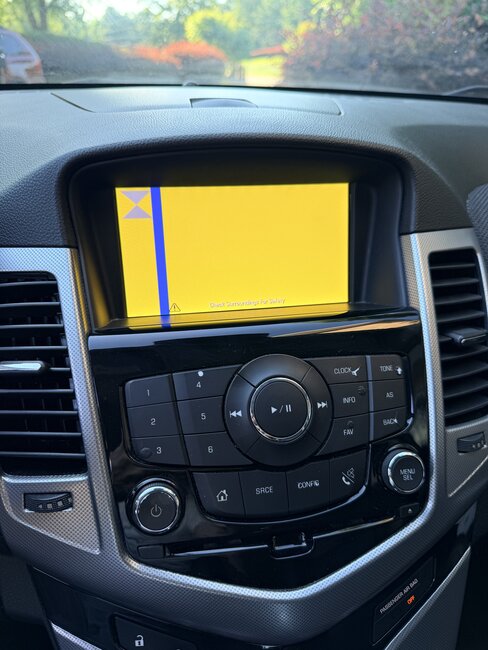
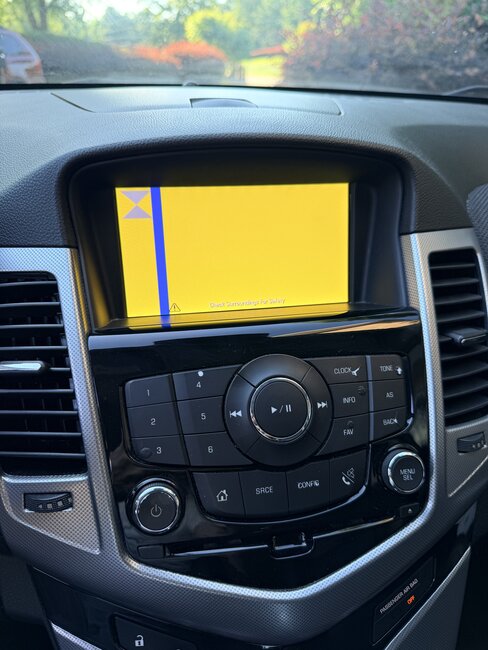
Camera issue yellow screen?

2013 CHEVROLET CRUZE
70,000 MILES • AUTOMATIC
Avatar
BHAMDOC1
  • MEMBER
  • 167 POSTS
Ever see this yellow screen when backing up?
Jun 5, 2026 at 11:07 PM
Advertisement
Avatar
AL514
  • CAR REPAIR CONTRIBUTOR
  • 5,524 POSTS
Hello, are you getting any codes in any modules at all? The first thing I would check would be the camera connector itself, so many times corrosion at the camera, it looks like a 6 wire connector, with at least 2 bulk connectors in between. I will post the wiring for it so you can check its power and ground. Is there any indicators on the dash, is “Forward Collision System Reduced” type messages? A code should be stored if there is a message, Im just going through the wiring here to see what modules are part of that system. With the location of most reverse cameras, they are exposed to the elements, so start with the connector if its not too much trouble to get to, and ill post the wiring diagrams to check each wire,
Jun 6, 2026 at 5:48 PM
Avatar
BHAMDOC1
  • MEMBER
  • 167 POSTS
I will check. No collision warnton this one its old
Jun 6, 2026 at 5:51 PM
Avatar
AL514
  • CAR REPAIR CONTRIBUTOR
  • 5,524 POSTS
ok, so no park assist or other options like that either then? Just a reverse camera and that display... Does the display show anything else at all other times?
Jun 6, 2026 at 5:56 PM
Avatar
AL514
  • CAR REPAIR CONTRIBUTOR
  • 5,524 POSTS
Here are the wiring/connector diagrams so you can check for power and ground at the camera, service info explains the rear video comes through the Radio or this Human Machine Interface control module (8th diagram). At least you can do some basic checks now. Look for any connectors exposed to the elements and check them first, I dont remember if you had a scope or not. If not thats ok. I assume you have Reverse lamps too?
Jun 6, 2026 at 6:25 PM
Avatar
BHAMDOC1
  • MEMBER
  • 167 POSTS
Ill check reverse lamps. Is rear camera connector easy to get to removing the panel?
Jun 6, 2026 at 7:15 PM
Avatar
AL514
  • CAR REPAIR CONTRIBUTOR
  • 5,524 POSTS
Im looking through service info right now for it, you can check for the 12v output at the BCM and see if its missing when put into Reverse. But I will post the rest of this info in just a bit.
Jun 7, 2026 at 12:06 AM
Avatar
AL514
  • CAR REPAIR CONTRIBUTOR
  • 5,524 POSTS
There was a section for a Rear camera malfunction, so hopefully this flow chart will help you out some, the cameras being located in the trunk lid, that where the wiring is going to come from, it looks like you still have power on the display, I would go check the camera itself, they dont last as long as they should being constantly exposed to hot/cold/ water, etc. I end up just replacing these cameras and most of the time the wiring going to it. These are mostly on bigger vehicles where the harness runs under the vehicle, but pulling down the trunk lid interior is a good place to start.
Jun 7, 2026 at 12:42 AM
Avatar
BHAMDOC1
  • MEMBER
  • 167 POSTS
REVERSE IS FINE, AND THE CAMERA SOMETIMES SHOWS OK
Jun 7, 2026 at 2:04 AM
Avatar
AL514
  • CAR REPAIR CONTRIBUTOR
  • 5,524 POSTS
If the camera does come on randomly, and see if you noticed anything when the camera does come on, ie hit a bump, hot/cold start, etc. Little details like that can sometimes help. Since its probably easiest to access the camera connector in the trunk on that end of the circuit, I would start there. You can go to the BCM and also check for it outputting the 12volts its supposed to when activating the camera, if its missing when going into Reverse, then you can go after that circuit, see if its shorting to ground pulling that 12volts to ground and not activating the camera. You can also check for the same 12v at the camera connector, this would be the better path because you can rule out wiring damage to that specific wire. I will post the BCM connector to check when putting it into Reverse, on many designs thats what triggers the rear camera, a signal from a reverse lamp or something along those lines.
While you're back there at the camera connector you can verify your power and ground as well. I did read there is also a bulk connector in the trunk that the wiring runs through, service info didnt have the location of every connector, so its a little bit of a search for these connectors. Intermittently working though is usually corrosion, pin fitment, or a module is on it's way out.
You dont have any codes in any modules of the vehicle? Even older historic codes?
Jun 7, 2026 at 6:56 PM
Avatar
BHAMDOC1
  • MEMBER
  • 167 POSTS
All of this is while parked not even driving. No codes. No corrosion on connector all clean. Most likely the camera. Power and ground are fine
Jun 7, 2026 at 7:08 PM
Avatar
AL514
  • CAR REPAIR CONTRIBUTOR
  • 5,524 POSTS
Are you getting the 12volt signal from the BCM on the Green/White wire at the camera connector? Needs to be checked while in reverse, but you can do this with just the key On engine off. If you want to go further with testing, it looks like the 3 wires for the camera run through the X900 bulk connector in the trunk, the X915 doesnt show any camera wires, its located in the trunk as well. If you just want to replace the camera and see if thats your repair, but I would check at least X900 if not already. But let us know what the fix is. Thanks
Jun 7, 2026 at 7:52 PM
Avatar
BHAMDOC1
  • MEMBER
  • 167 POSTS
REPLACED CAMERA AND ALL IS GOOD, THANKS
Jun 8, 2026 at 10:09 PM
Avatar
AL514
  • CAR REPAIR CONTRIBUTOR
  • 5,524 POSTS
Good call.. Although you do get most of these figured out pretty quick, have a nice evening.

Al
Jun 9, 2026 at 12:11 AM
Repair Safety Notice: This information is for general instructional purposes only. Vehicle repair can be dangerous. Verify all information, follow manufacturer service procedures, use proper tools and safety equipment, and consult a qualified repair shop when needed.