1999 Buick Regal Dash cluster lights not working.

1999 BUICK REGAL
85,000 MILES • 6 CYL • 2WD • AUTOMATIC
Avatar
WEEKENDCARREPAIR
  • MEMBER
  • 4 POSTS
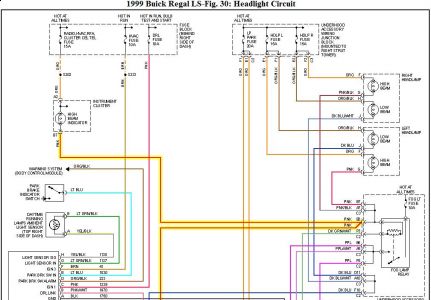
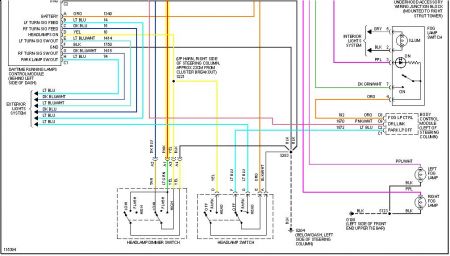
Dash/radio/climate control lights go to the lowest dim settings when the headlights automatically go on at night. When the headlights turn off however, the dash/radio/control module lights work great and the dimmer control can work as normal. The panel dimming fuseis fine and the headlight switch seems to be working. I assume the interior lights in the dash cluster are bad. How do I remove the dash cluster to replace the lights?
Mar 8, 2009 at 12:34 PM
Advertisement
Avatar
ZACKMAN
  • ASE Certified Mechanic
  • 4,202 POSTS
  • ASE Certified Mechanic


https://images.2carpros.com/forum/automotive_pictures/55316_99regalheadlight1_1.jpg


https://images.2carpros.com/forum/automotive_pictures/55316_99regalheadlight2_1.jpg

If the lights are working properly when the automatic light is off, then all the bulbs are fine. I would check your dimmer switch.
Mar 8, 2009 at 11:49 PM
Avatar
WEEKENDCARREPAIR
  • MEMBER
  • 4 POSTS
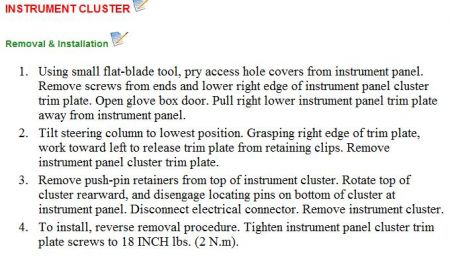
I checked the dimmer switch and it seems to be working fine. The lights for the speedometer don't work at all. These are the ones that I need to replace. Any advice on how to remove the instrument cluster?
Mar 9, 2009 at 9:57 AM
Avatar
ZACKMAN
  • ASE Certified Mechanic
  • 4,202 POSTS
  • ASE Certified Mechanic
Sorry, I misunderstood you when you said "lights go the the lowest dim setting with auto headlight. Anyway, to remove the instrument panel:


https://images.2carpros.com/forum/automotive_pictures/55316_99regalcluster_1.jpg

Mar 10, 2009 at 8:09 PM
Join 2CarPros for free, one of the most advanced car repair communities on the internet. From first-time drivers to seasoned mechanics, everyone is welcome to reply, share details, and get better answers. You can add a temporary image or video first; uploads are limited to 20 MB.
Ask a Free Question
Repair Safety Notice: This information is for general instructional purposes only. Vehicle repair can be dangerous. Verify all information, follow manufacturer service procedures, use proper tools and safety equipment, and consult a qualified repair shop when needed.