HVAC control problem

2004 GMC YUKON
209,000 MILES • 5.3L • V8 • 4WD • AUTOMATIC
Avatar
STEVIE9520
  • MEMBER
  • 5 POSTS
I just replaced the front and rear HVAC controls a few months ago. Everything was working great, but now I have an ongoing issue that's making me scratch my head. I have the auto dual climate controls, so normally if I adjust the temperature with just the driver side knob, and both sides are set at the same temperature, the knob will adjust the temperatures on both sides automatically until you use the passenger side knob. But that doesn't happen anymore, so now if I want hot on both sides, I have to turn both knobs. Kind of a pain to be honest. Are there any tricks that can fix this?
Oct 15, 2021 at 4:50 AM

Advertisement
Avatar
JACOBANDNICKOLAS
  • Experienced Mechanic
  • 110,240 POSTS
Hi,

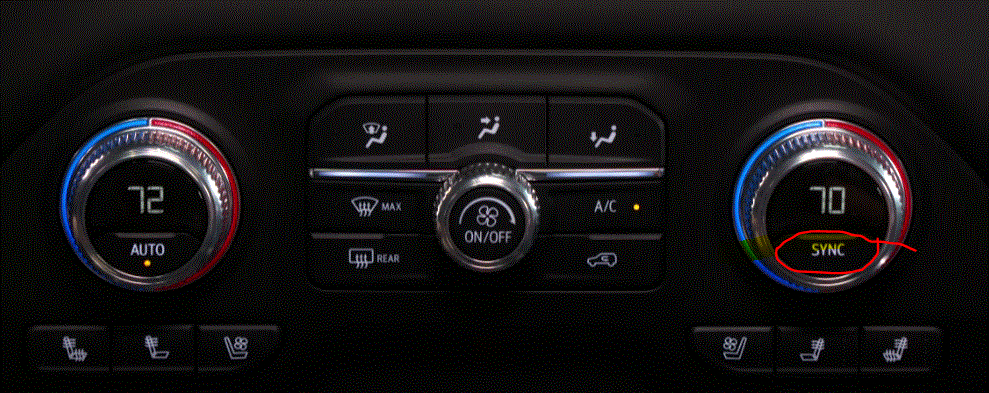
There should be a sync button that you press to have both sides the same. When pressed, the passenger side should be the same as the driver's selection. A light should turn on to indicated they are synchronized.

I looked everywhere for a pic specific to your vehicle without success. However, I did attach a pic from a similar vehicle and circled the sync button. Check to see if there is something similar to that on your vehicle.

Let me know if this helps.

Take care,

Joe

See pic below.

Oct 16, 2021 at 3:12 PM
Avatar
STEVIE9520
  • MEMBER
  • 5 POSTS
Okay, so to sync both sides I had to press and hold the "Auto" button. Then both arrows lit up. Thank you so much for your help!
Oct 16, 2021 at 9:46 PM
Avatar
ASEMASTER6371
  • Experienced Mechanic
  • 52,796 POSTS
Good morning,

This sounds like the control head has failed again.

What brand did you use, and can you give me the part number?

Roy
Oct 17, 2021 at 1:06 AM
Avatar
STEVIE9520
  • MEMBER
  • 5 POSTS
It didn't fail. It is now working. Somehow, I managed to un-sync the unit. Maybe I accidentally hit the auto button at one time or another.
Oct 17, 2021 at 8:28 AM
Avatar
JACOBANDNICKOLAS
  • Experienced Mechanic
  • 110,240 POSTS
Hi,

I'm glad to hear you got it working again. Please feel free to come back anytime in the future if you have questions or need help with something. You're always welcome here.

Take good care of yourself,

Joe
Oct 17, 2021 at 2:41 PM
Join 2CarPros for free, one of the most advanced car repair communities on the internet. From first-time drivers to seasoned mechanics, everyone is welcome to reply, share details, and get better answers. You can add a temporary image or video first; uploads are limited to 20 MB.
Ask a Free Question
Repair Safety Notice: This information is for general instructional purposes only. Vehicle repair can be dangerous. Verify all information, follow manufacturer service procedures, use proper tools and safety equipment, and consult a qualified repair shop when needed.